01 · Business categories
Business categories, built in
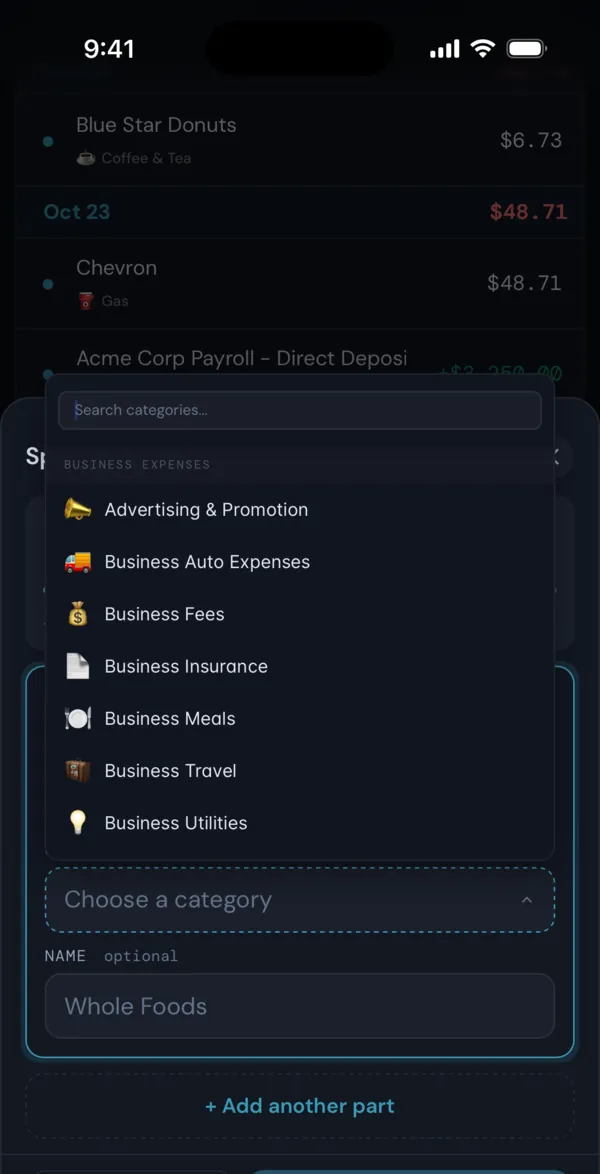
New accounts start with a Business Expenses group: Advertising & Promotion, Business Utilities, Employee Wages & Labor, Business Travel, Business Meals, Business Auto Expenses, Business Insurance, Office Supplies & Expenses, Office Rent, Postage & Shipping, Business Fees and Business Taxes. The Income group has Business Income.
You can rename, add or delete any of them. Type Business Expenses into Search to open a page that adds up every category in the group.
02 · Business categories
Rules that file business charges for you
A transaction rule matches on name, amount or category and can set a new category or add a label. For example, every charge containing a software vendor’s name can go to Business Fees on its own, for new transactions and the ones you already have.
If FIYR finds payroll deposits it cannot place, Settings > Savings Rate lets you mark them It's side income. That moves them to Business Income and adds a rule so new ones follow.
03 · Split transactions
Split mixed receipts
One card swipe at an office supply store can be part business and part personal. Split it into parts with their own categories, and the business part lands in Business Expenses. Labels tag anything you want to find at tax time.
04 · Alerts
Alerts and Ask Fiyr on business spending
Alerts work on any category, business ones included, so once there are a couple of months of history, a jump in Advertising & Promotion against its usual shows up on its own. Ask Fiyr can total spending by category or group for any period, like “How much did I spend on Business Travel this year?”.
05 · Business categories
Export for your accountant
On a computer, Export CSV on the Transactions page downloads every loaded transaction with its category, labels and account, ready to filter in a spreadsheet.
Good to know
- FIYR is not bookkeeping or accounting software. It does not send invoices, run payroll or file taxes.
- Rules cannot match on the account a charge came from. To separate a business card, match on merchant names, or use a label.
- Export CSV is on a computer only, and covers transactions, not budgets or net worth.
Phone screenshots are from the FIYR iPhone app on the demo account, so the numbers are sample data. The iPhone app is coming soon to the App Store; the same screens work in your phone’s browser at fiyr.app today.